
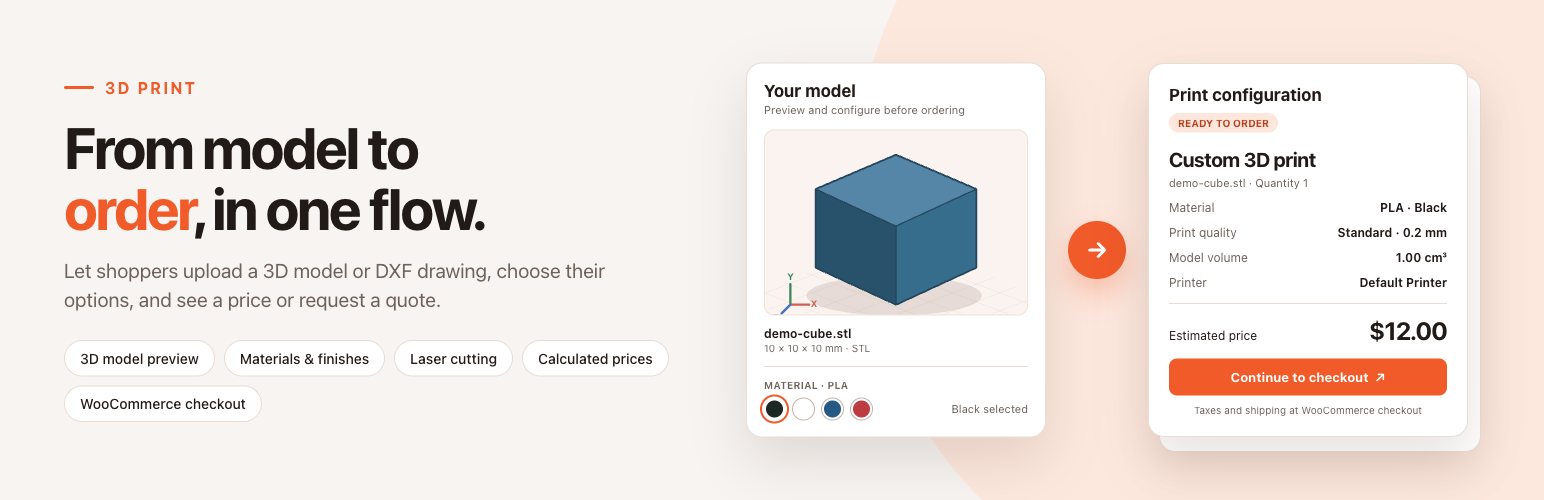
3DPrint – 3D Print Calculator turns your WooCommerce store into a self-service 3D printing and laser cutting shop. Customers upload an STL, OBJ, 3MF, STEP or DXF file, inspect it in an interactive 3D preview, choose material, printer, print quality, coating, post-processing and infill, watch the price update instantly and pay with any WooCommerce payment method. When a job cannot be priced automatically, the configurator switches to a price request form by itself, so you never lose a lead. Insert the 3DPrint block or the [yeekit_3d] shortcode on any page – no coding required.
MAIN FEATURES
- Instant online quotes – upload a model, pick the options, see the price. The server recalculates every price at submission and again at checkout, so the customer always pays the current catalog price.
- Interactive 3D preview – STL (ASCII and binary), OBJ, 3MF and STEP/STP rendered in the browser with dimensions, volume, surface area and triangle count, in the selected material color.
- Five print option catalogs – Materials, Printers, Coatings, Post-processings and Infills, each a WordPress post type with its own editor and price.
- Smart compatibility – after the first choice, later lists show only compatible options; single-option steps are hidden and selected automatically.
- Flexible pricing rules – fixed per piece, % of material, per gram, per cm³ of solid or bounding volume, per cm² of surface or bounding XY area, per cm³ of support material, per cm³ of removed material, per cm of laser cutting path, plus setup fees once per model.
- Four checkout behaviors – straight to checkout, add to cart + checkout, estimate + request price, or request price only.
- Automatic price request fallback – blank prices, zero-priced materials or unsupported files switch the form to a quote request with configurable fields and email notification.
- Laser cutting from DXF – 2D preview, Cut / Engrave / Ignore per layer, cut and engrave length measured on the server and priced per cm.
- Cloud PrusaSlicer analysis – optional hosted slicing for real material usage, support volume, print time and filament weight. Nothing to install on your server.
- Native WooCommerce checkout – classic checkout, Cart/Checkout Blocks and HPOS; every upload is its own cart line with a private file and price snapshot; tax, coupons, shipping and payments work as usual.
- Quotes and Orders dashboard – every uploaded model, unviewed counters, model stats, selected options, customer contact, original file download and a link to the WooCommerce order.
- Private files – models live in a private database table, never in the public Media Library; only shop managers and the order owner can download them.
- One-click sample data – a complete editable starter catalog for 3D printing and CNC / laser cutting.
3D PREVIEW
- STL, OBJ, 3MF and STEP/STP – STEP is converted in the browser with OpenCascade WebAssembly.
- Bounding dimensions, volume, surface area, triangle count and solid-mesh volume.
- Switch displayed units (mm / cm / in) and scale the model by editing any X/Y/Z size – the other sizes and the price follow.
- Build-volume warning when the model exceeds the selected printer.
- Customizable scene – background, ground, grid, fog, XYZ axes, build volume box, light positions, auto rotation, shadows, auto-fit and auto-scaling.
- “Explore the Demo” card loads a sample cube so visitors can try the configurator without uploading anything; upload your own demo model if you prefer.
- All viewer assets are bundled locally – no external CDN.
PRINT OPTION CATALOGS
- Materials – base price with a configurable pricing basis, up to 20 extra price rows, preview color, density, optional layer-height override and allowed printers.
- Printers – price per piece, one setup fee per uploaded model, build volume, editable Print Quality choices with layer heights, compatible materials.
- Coatings – optional single choice, price per piece.
- Post-processings – multiple choice (checkboxes) or single choice (radio / dropdown), price per piece.
- Infills – percentage, price per piece.
- Display modes per catalog – grouped select with colors, color palette by group, radio list, checkboxes, dropdown, selectable list, or hidden.
- Materials first or Printers first, standard or accordion step layout, themed with your main brand color.
PRICING
Price = sum of selected option prices × quantity, plus Material and Printer setup fees once per uploaded model. Material base prices and extra price rows can be calculated from:
- Fixed per piece or % of the base material price
- Per gram – actual or volumetric weight
- Per cm³ of solid volume or bounding-box volume
- Per cm² of surface area or bounding XY area
- Per cm³ of support material, or a fixed charge when supports are needed (cloud slicer)
- Per cm³ of removed material for subtractive work
- Per cm of laser cutting path (DXF)
Prices follow your WooCommerce currency and tax settings. Explicitly zero-priced printers, coatings, post-processings and infills are free options. A read-only Pricing guide tab in the settings explains every rule with a worked example.
CHECKOUT AND PRICE REQUESTS
- Calculate price and add to checkout – one button straight to payment.
- Calculate price and add to cart and checkout – separate Add to cart and Checkout buttons.
- Give an estimate and request price – shows an estimated subtotal and collects contact details.
- Request price – collects contact details only, no price shown.
- Request form – email always required; Full name, Company, Phone and Notes can be required, optional or hidden.
- Email notification with a custom recipient, subject and {quote_id} placeholder, linking to the protected quote in your admin. The model file is never attached or exposed.
LASER CUTTING (DXF)
- ASCII DXF drawings up to 5 MB get a 2D preview and a dedicated laser-cutting configurator.
- Cut, Engrave or Ignore for every layer.
- Cut length priced per cm of path; engraving uses the machine’s engraving rate per cm.
- LINE, CIRCLE, ARC, ELLIPSE, straight LWPOLYLINE and SPLINE entities. Other entities and DWG files fall back to the manual quote form.
- Sample data includes a Default Laser Cutter plus Plywood 3 mm and Acrylic 3 mm materials.
CLOUD PRUSASLICER ANALYSIS (OPTIONAL)
- Sliced material usage, support volume, print time and filament weight – and pricing by support volume or print hours.
- Printer settings control nozzle diameter, layer height, speed and automatic supports; Infill settings control percentage and pattern; Material settings control filament diameter and density.
- PrusaSlicer is not required on your hosting. 50 free test analyses per site; a purchase code unlocks 5,000 analyses per month shared across your sites.
- Switch it off at any time – models are then never sent to the service.
Related plugins

YeeSubscriptions – Subscriptions for WooCommerce
The fastest, lightest subscription and recurring billing engine built natively for WooCommerce

YeeMenu – Restaurant Menu for WooCommerce Pro
The Ultimate Restaurant Menu Solution for WooCommerce

YeeCheckout – Conditional Payments, Shipping & Fields for WooCommerce

PDF Catalog for WooCommerce + Drag And Drop Template Builder Pro
Let your customers generate professional product catalogs directly from the frontend – no coding needed!
Reviews
There are no reviews yet.