
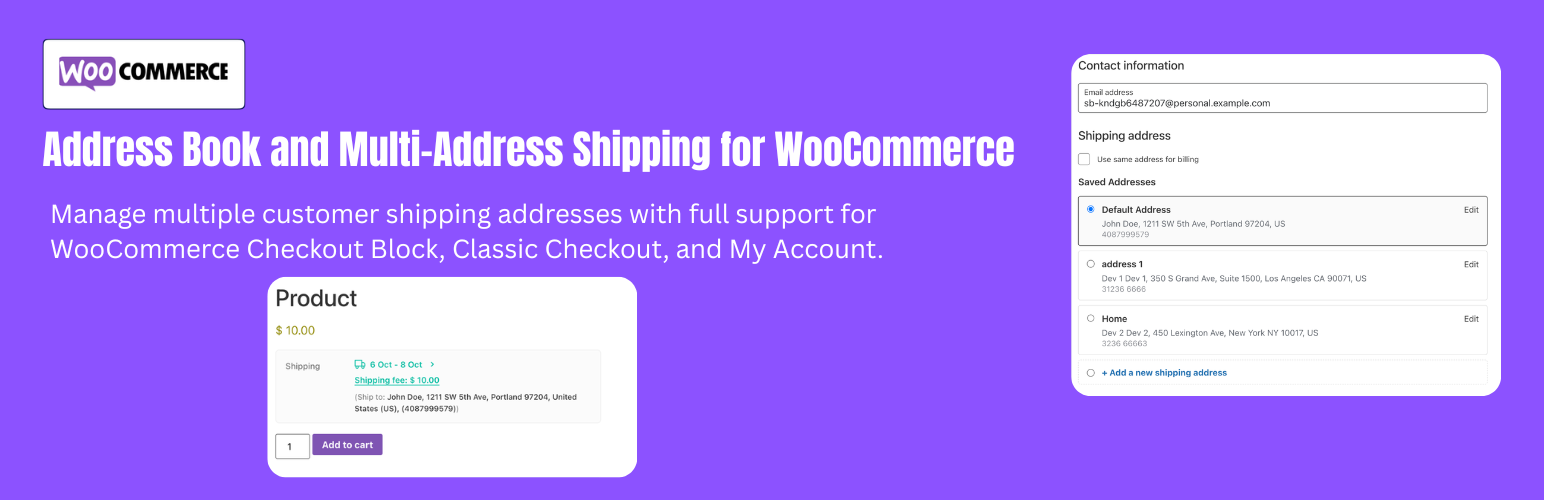
Address Book – Multi-Address Shipping for WooCommerce is a complete, enterprise-grade shipping and customer address management solution. Allow your customers to save multiple shipping addresses with personalized nicknames, split cart items to ship to multiple different recipients within a single order, and display real-time shipping costs and estimated delivery dates directly on single product pages.
Built natively for both the modern WooCommerce Checkout Block (Gutenberg) and classic checkout shortcodes, with 100% High-Performance Order Storage (HPOS) compatibility.
Why Choose Address Book & Multi-Address Shipping for WooCommerce?
Modern eCommerce shoppers expect convenience and flexibility. Whether sending corporate gifts to multiple company branches, delivering holiday presents to different family members, or managing personal home and office addresses, this plugin eliminates checkout friction and boosts your store’s average order value (AOV).
- Customer Address Book: Logged-in customers can store unlimited shipping addresses in their My Account area with custom labels (e.g., Home, Office, Warehouse).
- Multi-Address Shipping: Customers can split quantities of items in their cart and ship them to different addresses in a single order, paying for each shipping package individually.
- Product Page Shipping Estimator: Live shipping fee calculation and estimated delivery date range directly on single product pages, driving faster purchasing decisions.
- Smart Cart Detection: Multi-address shipping options automatically display only when the cart contains more than 1 item or a quantity greater than 1, keeping single-item checkouts clean and fast.
- Native Checkout Block & Store API: Seamlessly integrated with WooCommerce Cart & Checkout Blocks with interactive address selection dropdowns and instant rate recalculation.
- 100% HPOS & Custom Order Tables: Built from the ground up for WooCommerce High-Performance Order Storage, ensuring lightning-fast database performance.
- Dynamic Checkout Fields Sync: Automatically inherits custom checkout fields (such as state, district, ward, or VAT) added by your theme or third-party plugins.
- Smart Auto-Migration: Existing customer shipping or billing information is automatically imported as their primary default address on first login.
Comprehensive Feature Breakdown
1. Customer Address Book (My Account & Checkout)
- Dedicated My Account Endpoint: Customers can view, add, edit, and delete shipping addresses under My Account → Address Book.
- Custom Address Labels & Nicknames: Give addresses memorable names such as “Mom’s House”, “Headquarters”, or “Branch 2”.
- One-Click Default Address: Set any address as the primary default shipping address with visual badge indicators. Default addresses pre-fill checkout and power product page shipping calculations.
- Dynamic Form Rendering: Uses standard
woocommerce_form_field()to guarantee complete compatibility with localized country/state dropdowns and custom checkout field plugins. - Automatic Address Fallback: Automatically imports customer addresses from previous orders or profile meta if their address book is initially empty.
2. Multi-Address Shipping (Split Order to Multiple Destinations)
- Visual Item Allocation Modal: Customers click “Ship to Multiple Addresses” to open a clean modal where they can assign quantities of each product to different saved or new addresses.
- Quantity Validation Badges: Real-time status indicators (“Fully allocated”, “Unallocated items remaining”, “Exceeds cart quantity”) ensure accurate distribution before checkout.
- Add Addresses on the Fly: Customers can add new delivery destinations directly inside the modal without leaving the checkout page.
- Dynamic Package Splitting: The plugin divides the cart into separate WooCommerce shipping packages (
woocommerce_cart_shipping_packages), calculating individual carrier rates for each destination. - Maximum Address Limits: Store owners can set a maximum allowed number of distinct delivery addresses per order to protect against fulfillment complexity.
3. Single Product Shipping Fee & Delivery Date Estimator
- Accurate Cost Estimation: Displays real shipping fees based on the customer’s saved default address or geolocation zone.
- Variable Product Support: Automatically recalculates shipping rates and delivery estimates via AJAX whenever a customer selects different variation attributes (sizes, weights, materials).
- Virtual Product Filtering: Automatically hides the estimator on virtual or downloadable products where physical shipping is not required.
- Out-of-Zone Detection: Displays a clear “Unserviceable Area” notification if no shipping methods service the destination address.
- Estimated Delivery Days: Configure minimum and maximum delivery transit days for each shipping method (Flat Rate, Free Shipping, Express, Local Pickup).
- Exclude Weekends Option: Automatically excludes Saturdays and Sundays when calculating projected delivery dates for realistic customer expectations.
- Flexible Display Positions: Place the estimator before the add-to-cart button, after the button, below the price, below the short description, after product meta.
4. Dual Checkout Architecture Support
- WooCommerce Checkout Block (Gutenberg): Native Store API integration with a sleek address selector dropdown, inline address editing, and instant totals refresh.
- Classic Checkout Support: Full support for standard themes and stores using the with automatic address selectors and save-to-book checkboxes.
5. Admin Order Fulfillment & Notifications
- Multi-Package Admin Order Breakdown: View detailed destination cards inside the WooCommerce Order Edit screen, including recipient names, phone numbers, addresses, and allocated item quantities.
- Transparent Customer Confirmation: Multi-address distribution breakdowns are displayed on the Thank You (Order Received) page and in My Account order details.
- Transactional Email Integration: Package details, destinations, and assigned items are automatically included in customer order confirmation emails and admin new order emails.
Related plugins

YeePOS – PWA Point of Sale for WooCommerce Pro
YeePOS is a fast, offline-first Point of Sale (POS) system for WooCommerce, built as a Progressive Web App (PWA).

WooCommerce – Perfex CRM Integration
The plugin has the ability to import/capture customers from WooCommerce orders! To automatically add/update WooCommerce orders to your Perfex CRM! Have full control over what is sent, and when it is sent to get all the data you need.

YeeDiscounts – Dynamic Discounts for WooCommerce
Looking to boost sales, increase Average Order Value (AOV), and run unlimited promotional campaigns for your WooCommerce store?
YeeDiscounts is the answer. It’s not just a discount plugin; it’s an automated marketing machine designed to turn visitors into loyal buyers.

YeeSubscriptions – Subscriptions for WooCommerce
The fastest, lightest subscription and recurring billing engine built natively for WooCommerce
Reviews
There are no reviews yet.