1. Introduction
Conditional Checkout for WooCommerce allows you to control checkout behavior dynamically by applying conditions to payment methods, shipping methods, shipping destinations, and checkout fields.
The goal is simple: show only what is relevant to the customer, based on their cart, location, and selections.
Instead of hiding checkout fields or modifying WooCommerce core behavior, the plugin validates conditions when the customer places an order and displays a custom notice if the rule is violated.
This approach ensures full compatibility with WooCommerce Checkout Blocks and avoids UX issues.
Table of contents:
2. Plugin Overview
The plugin settings are organized into four dedicated tabs:
- Conditional Payments
- Conditional Shipping Method
- Conditional Shipping Destinations
- Conditional Billing, Shipping, Note Fields
Each rule is evaluated independently and only affects the components you explicitly configure.
3. How the Plugin Works (Basic Concept)
Every feature in this plugin follows the same logic:
IF conditions are met → THEN apply an action
• Conditions decide when a rule is triggered
• Actions decide what happens when the rule is triggered
4. Conditional Checkout for WooCommerce
Before jumping into examples, let’s quickly understand the rule structure.
Every rule has:
• Enable this rule – turn the rule on or off
• Description – optional, for your own reference
• Action – what happens when conditions are met
• Targets – what you want to control
• Conditions – when the rule should apply
• Operator – AND / OR logic between conditions
The logic is always:
If conditions are true → apply the action
4.1 Conditional Payments
Conditional Payments allows you to control the availability of payment gateways based on defined conditions.
What you can do
- Enable or disable specific payment methods conditionally
- Apply rules based on cart, customer, or shipping data
- Affect only the selected gateways
- Leave all other payment gateways untouched
How it works
When checkout is loaded or updated, payment gateways are filtered based on the rule conditions.
If a rule applies, only the selected gateways are modified.
Common use cases
- Disable Cash on Delivery for high-value orders
- Allow bank transfer only for specific customer roles
- Restrict certain gateways by country or state
This feature is compatible with WooCommerce Payments and all third-party gateways.
Example Use Case
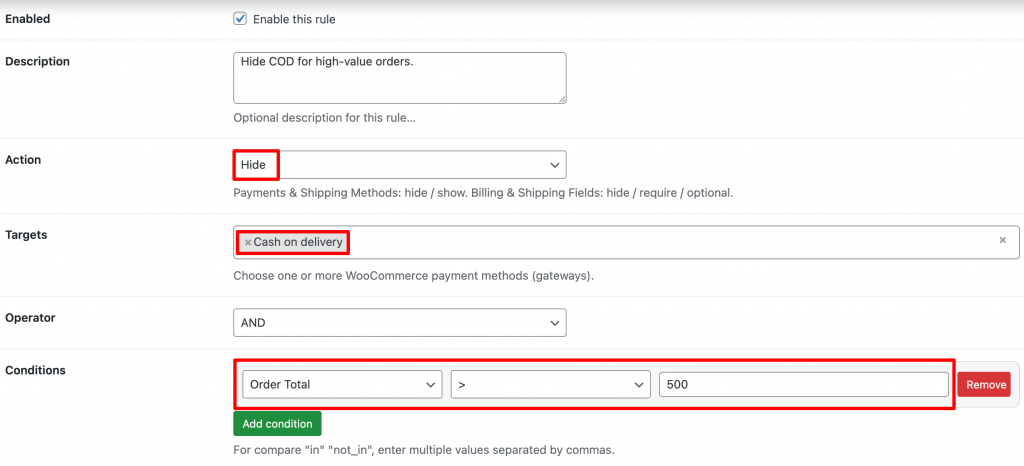
Hide Cash on Delivery (COD) for orders over $500.
How To Set Up
Go to WooCommerce → Settings → Conditional Checkout
Open the Conditional Payments tab
Click Add New and configure
Conditions
• Cart Total > 500
Action
• Hide Payment Method → Cash on Delivery
Result
• Orders below $500: COD is available
• Orders above $500: COD is automatically hidden
4.2 Conditional Shipping Method
Conditional Shipping Method allows you to control which shipping methods are available based on checkout conditions.
Key behavior
- Shipping methods are conditionally enabled or disabled
- Only selected shipping methods are affected
- Other shipping methods remain available
- Conditions are evaluated dynamically
Supported logic examples
- Disable Free Shipping when the cart weight exceeds a limit
- Allow Local Pickup only for specific countries or states
- Restrict certain shipping methods to specific products or categories
This ensures flexible shipping logic without interfering with WooCommerce shipping zones.
Example Use Case
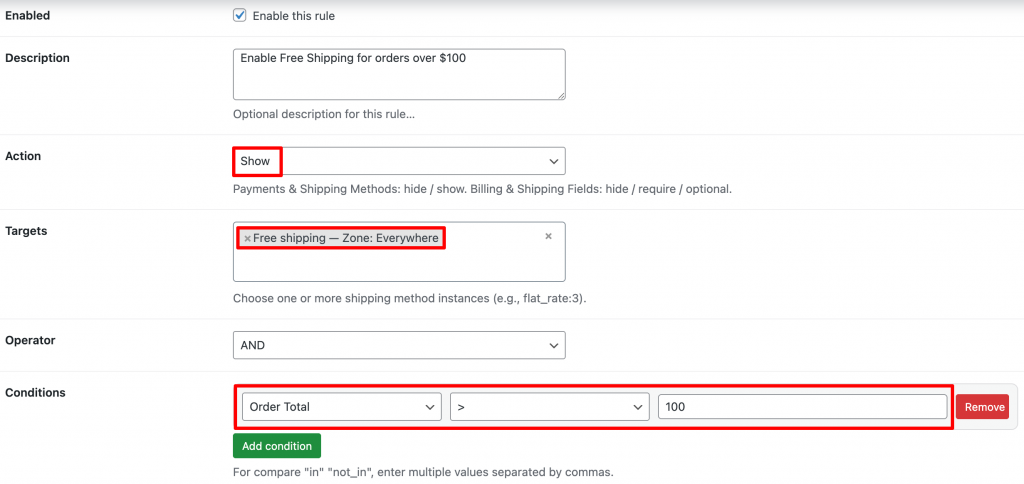
Enable Free Shipping for Orders Over $100
How To Set Up
Go to WooCommerce → Settings → Conditional Checkout
Open the Conditional Shipping tab
Click Add New and configure
Conditions
• Cart Total ≥ 100
Action
• Show Shipping Method → Free Shipping
Result
• Customers with smaller carts do not see Free Shipping
• Free Shipping appears automatically when the condition is met
4.3 3. Conditional Shipping Destinations
Restrict or allow where customers can ship their orders based on the condition
Important design choice
- Countries and states are NOT hidden from checkout
- Customers can still select any destination
- Validation occurs when the customer places the order
- If the destination is not allowed, checkout is blocked with a clear notice
Example Use Case
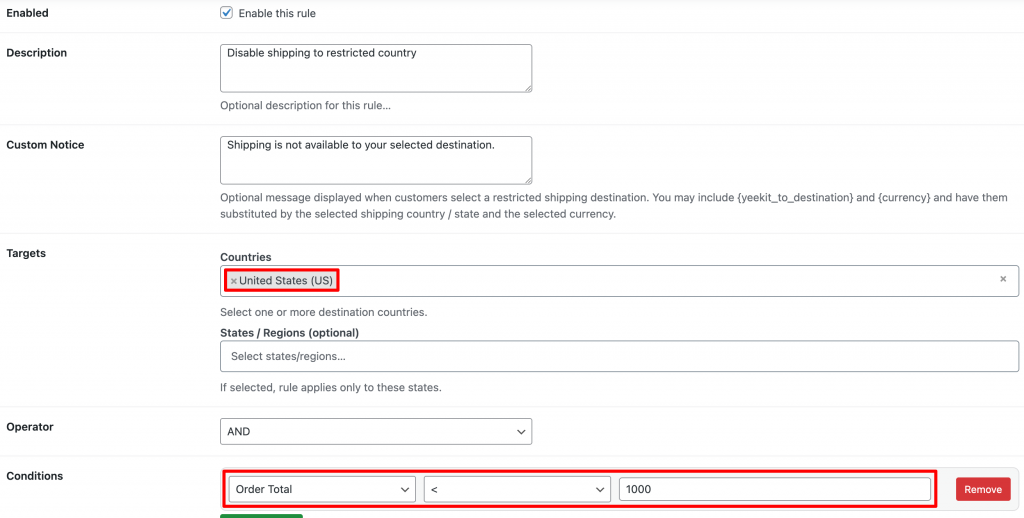
Disable Shipping to Certain Countries
How To Set Up
Go to WooCommerce → Settings → Conditional Checkout
Open the Conditional Shipping Destination tab
Click Add New and configure
Conditions
Cart Total < 1000
Countries:
• Shipping Country = United States
Action
• Disable Shipping Destination
Result
• Customers from these countries cannot proceed with shipping
4.4 Conditional Billing, Shipping, Note Fields
This module allows you to apply conditional logic to checkout fields, including:
- Billing fields
- Shipping fields
- Order notes
Example Use Case
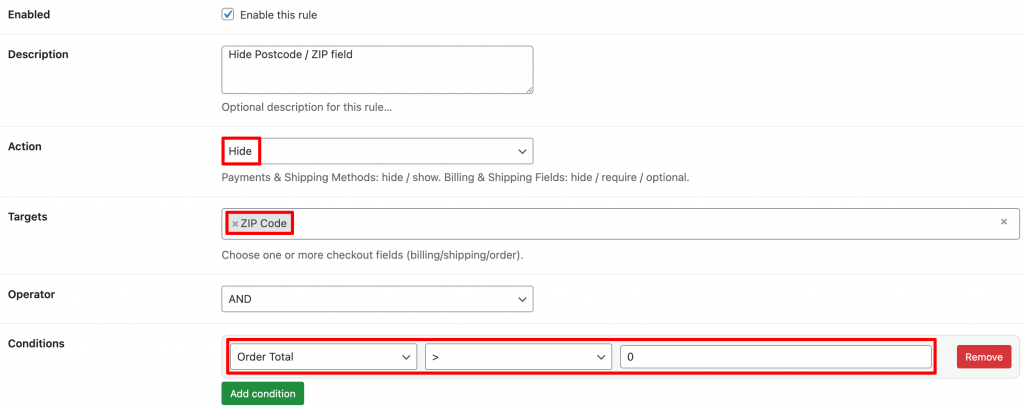
Hide the Postcode / ZIP code field.
How To Set Up
Go to WooCommerce → Settings → Conditional Checkout
Open the Billing & Shipping tab
Click Add New and configure
Action: select Hide
Targets: choose Postcode / ZIP.
Ccondition:
Order Total > 0
This means the field will always be hidden.